ArtCraft’s Crafting Apps on Linux: all 7 free Adobe alternatives
Yes, all seven run natively on Linux. ArtCraft’s Crafting Apps are free, open-source (MIT or Apache-2.0) reimplementations of Photoshop, Illustrator, Premiere Pro, Lightroom, Acrobat, After Effects and InDesign, written in Rust, and every release ships an AppImage, a Flatpak bundle, .deb and .rpm for x86_64 and ARM64. They are also a week old: first released on October 1–2, 2026, built largely with AI, and by their developers’ own measure not yet ready for professional work.
The seven Crafting Apps, and what each replaces
Each app has its own page with Linux install commands, screenshots, known Linux issues and the best established alternative.
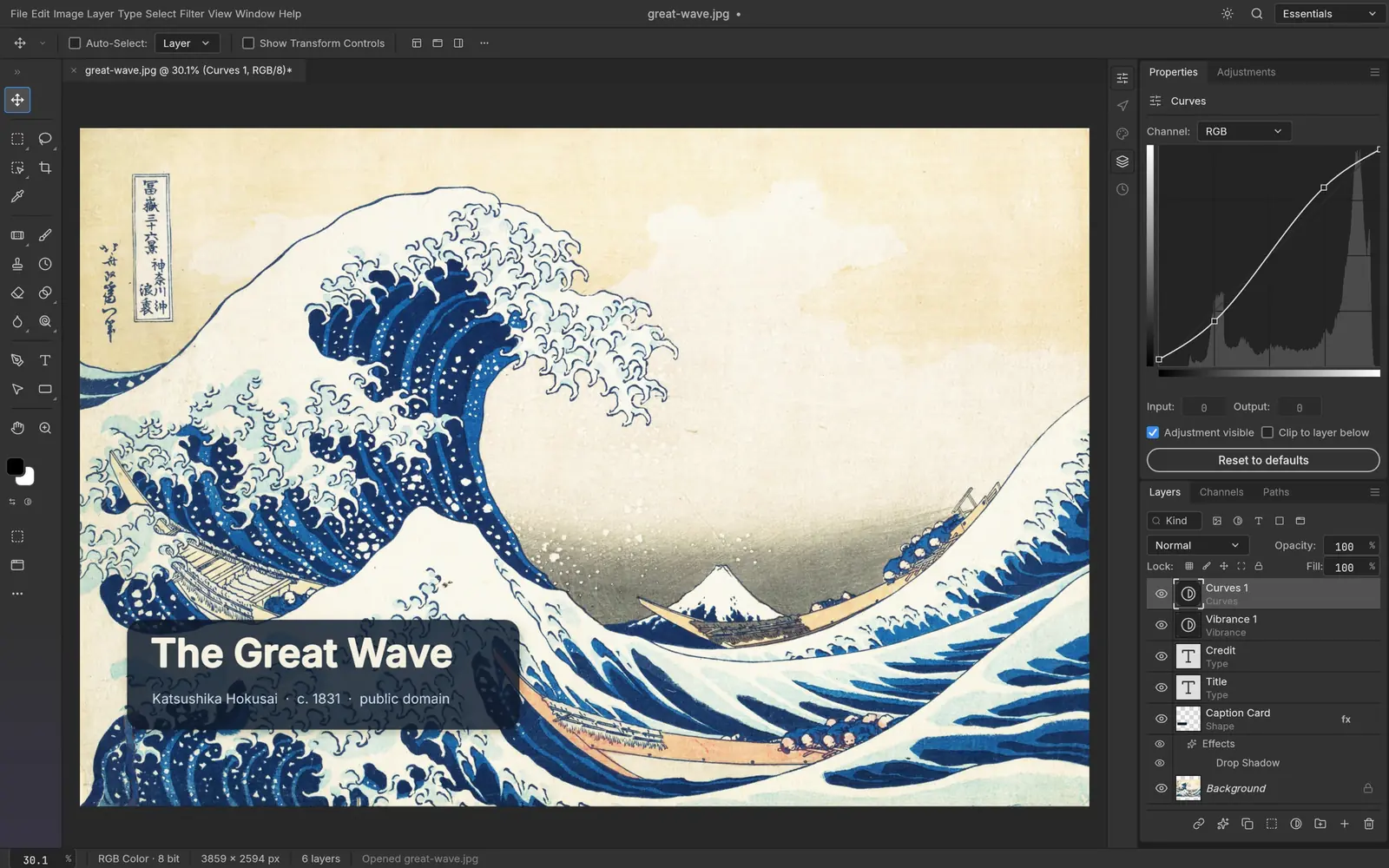
 PhotoCraftReplaces Adobe PhotoshopImage editingPhotoCraft on Linux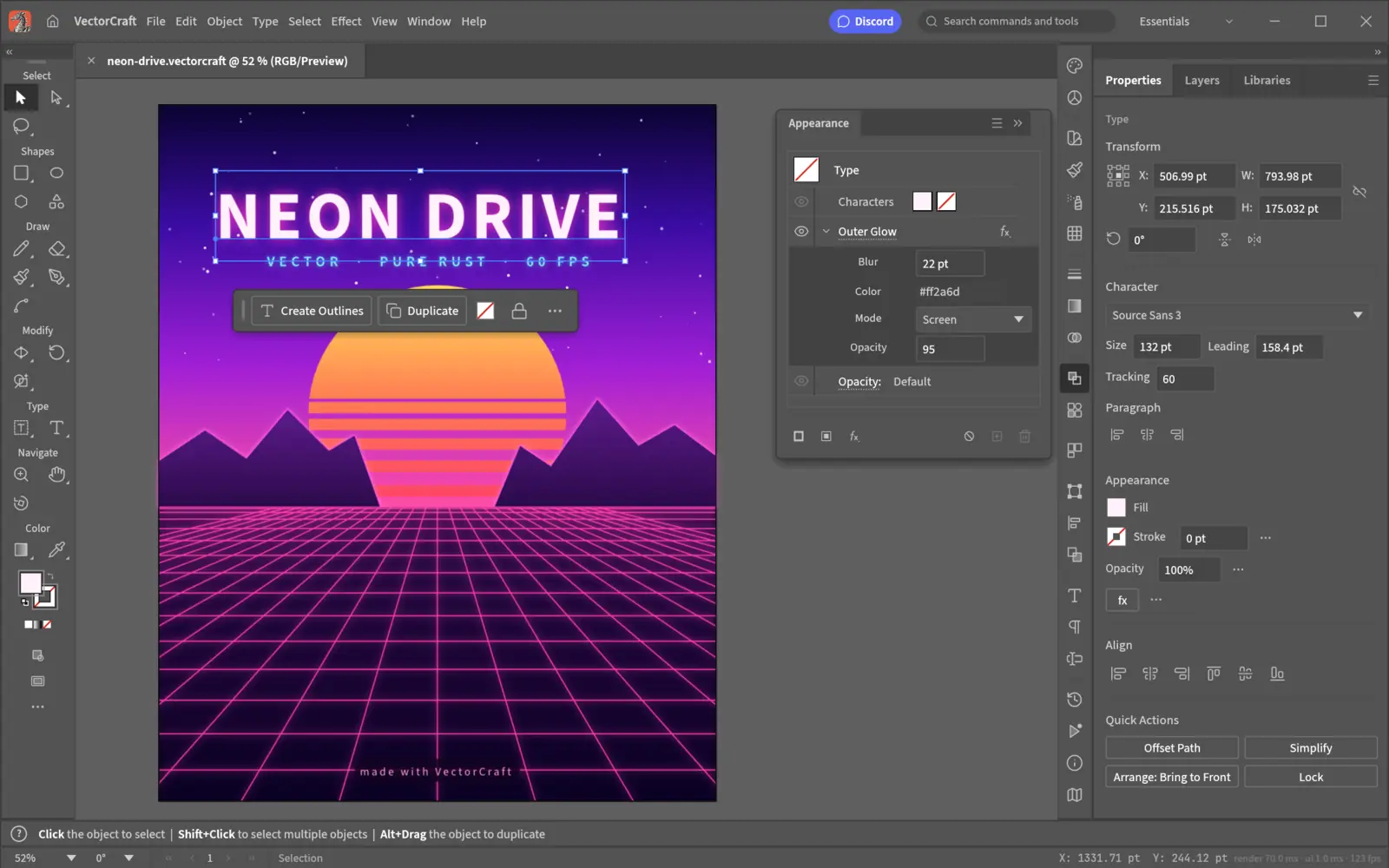
 VectorCraftReplaces Adobe IllustratorVector illustrationVectorCraft on Linux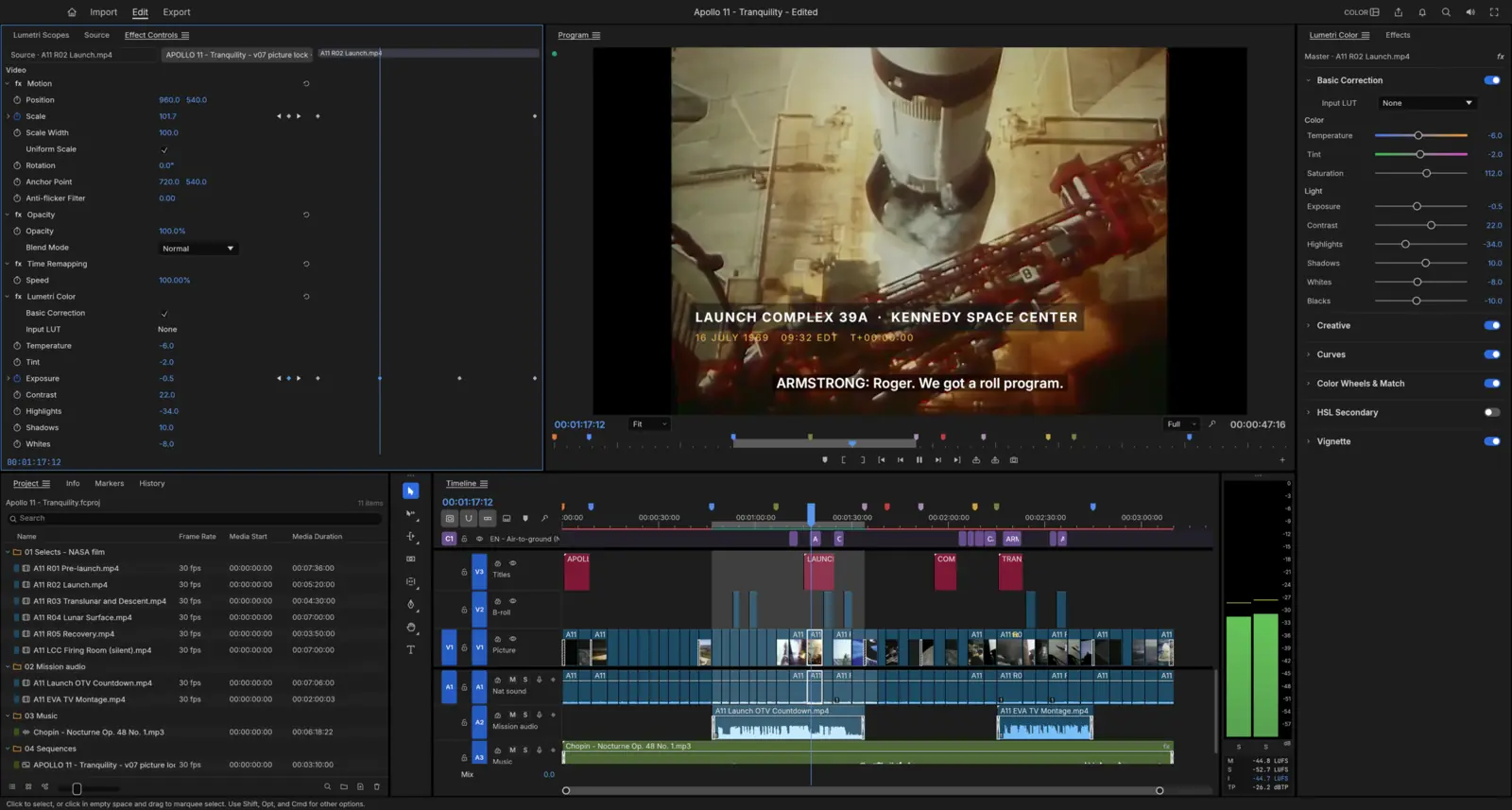
 FilmCraftReplaces Adobe Premiere ProVideo editing, color and soundFilmCraft on Linux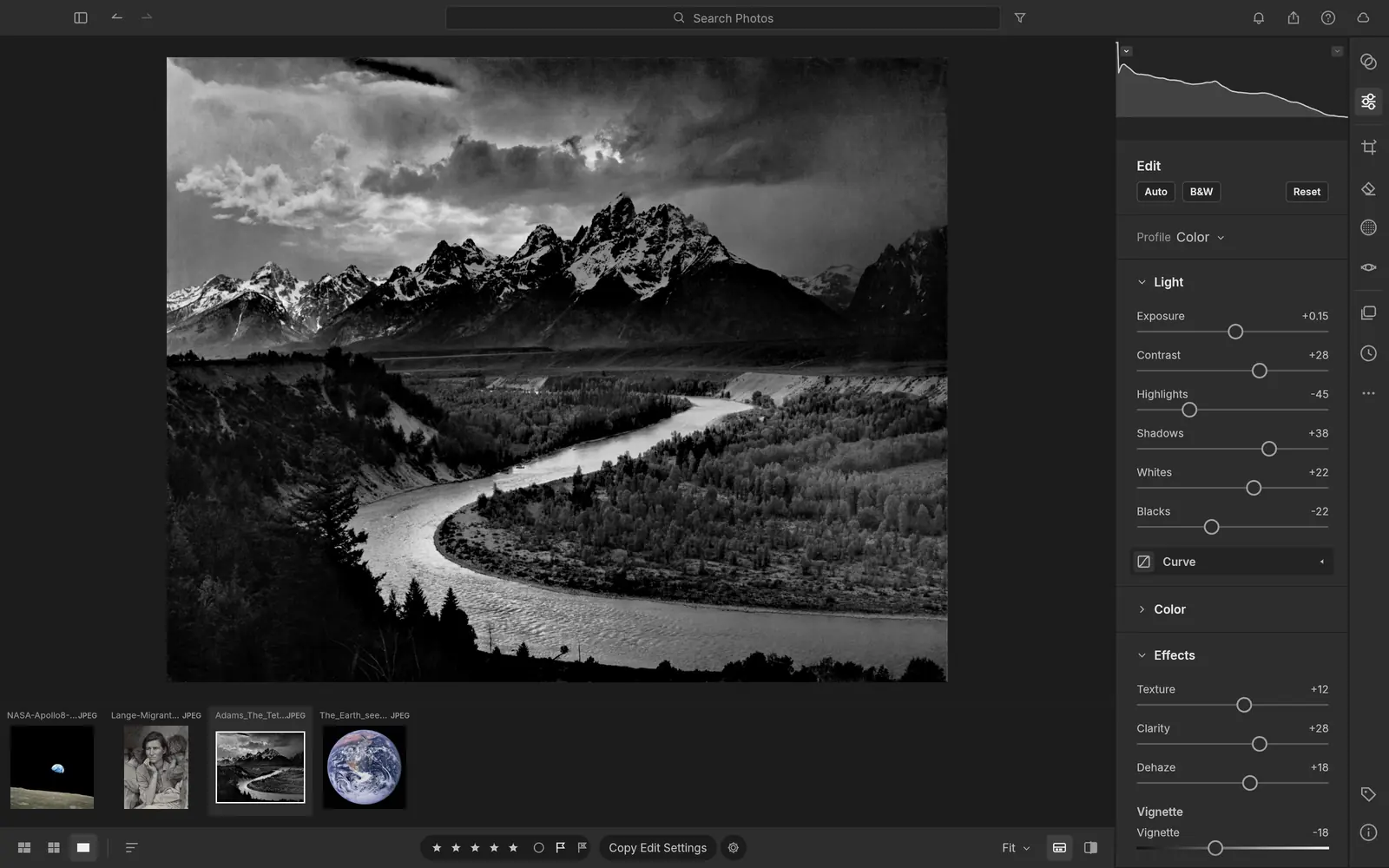
 LightCraftReplaces Adobe LightroomPhoto library and raw developmentLightCraft on Linux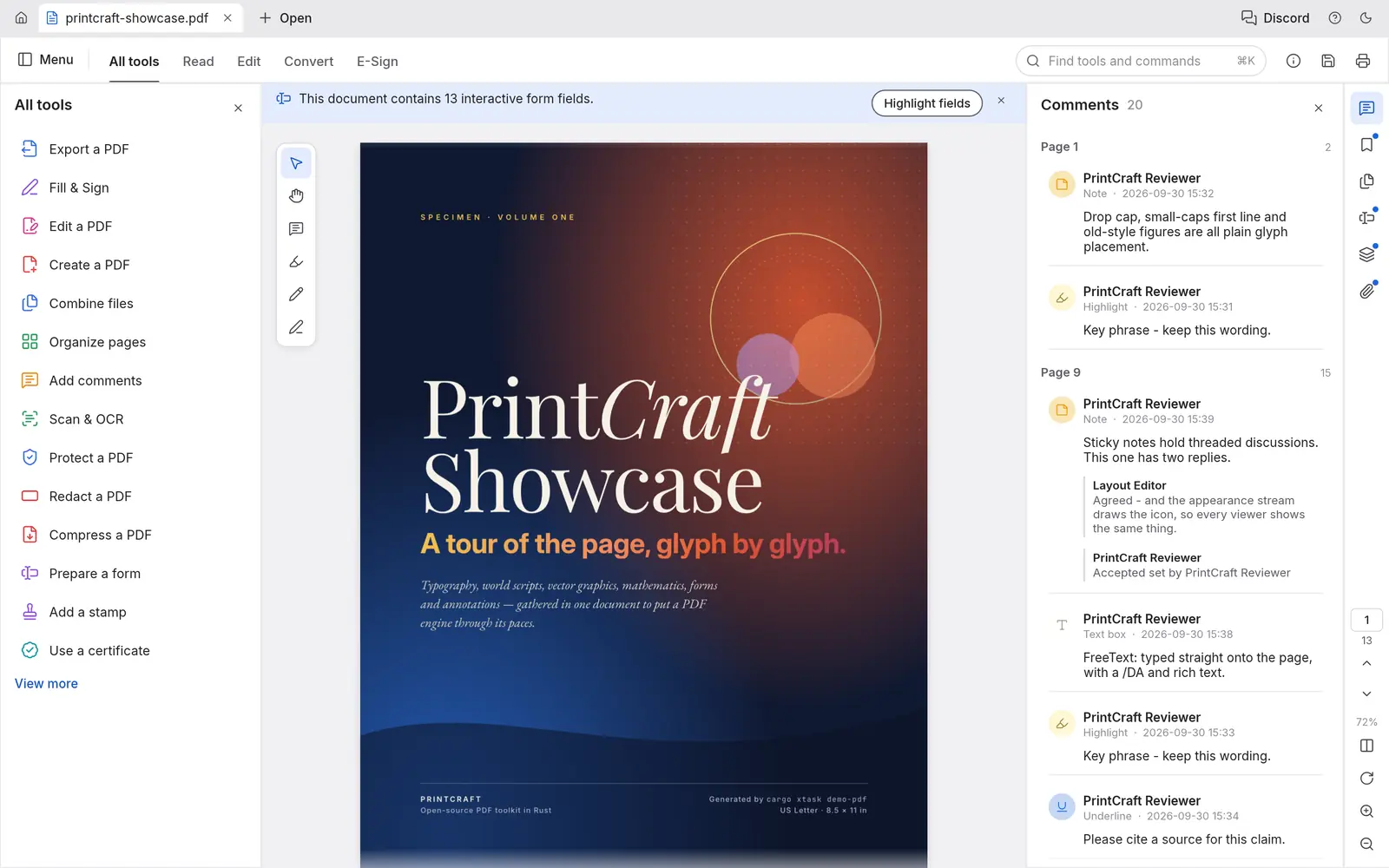
 PdfCraftReplaces Adobe AcrobatReading, organizing and protecting PDFsPdfCraft on Linux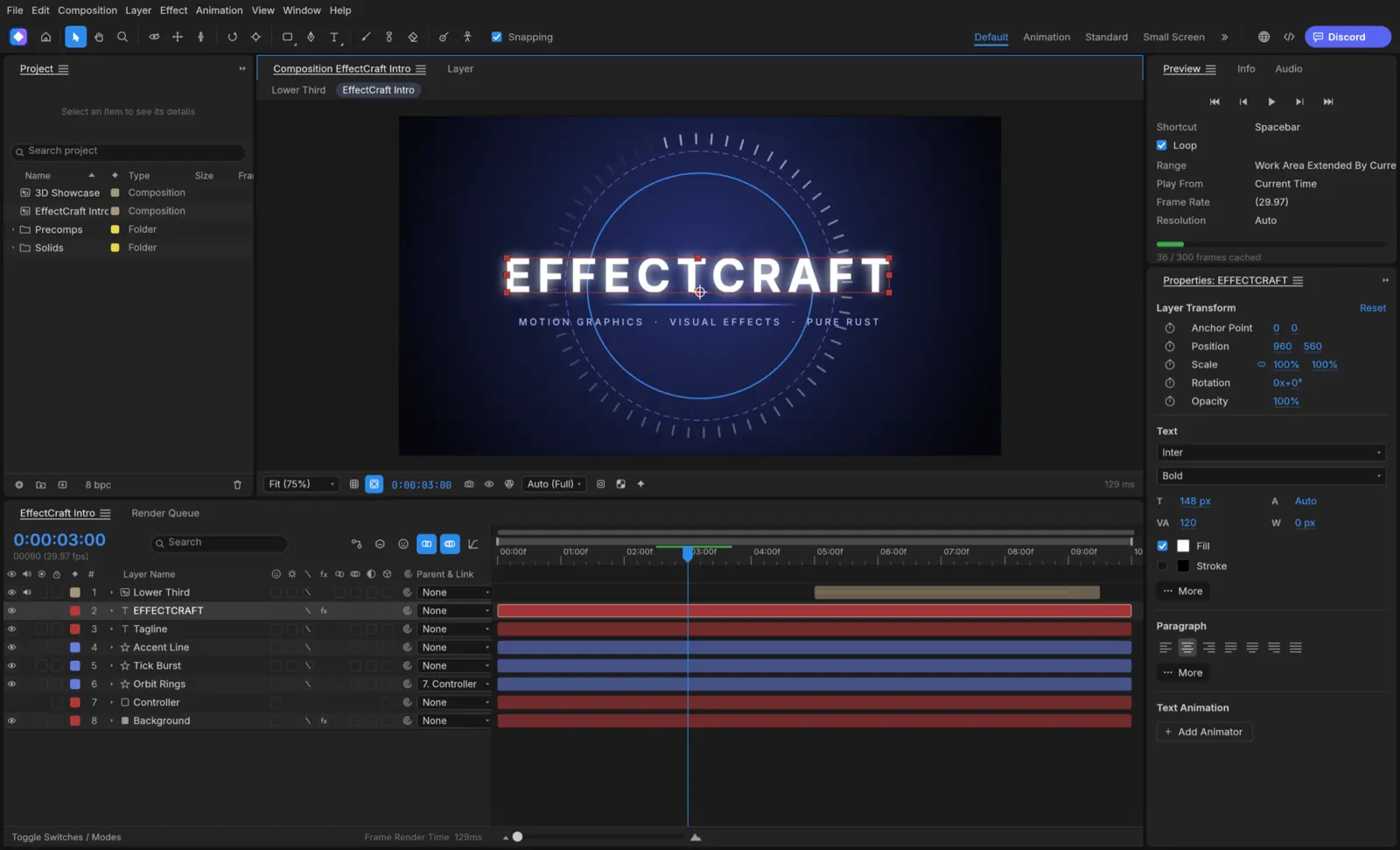
 EffectCraftReplaces Adobe After EffectsMotion graphics and visual effectsEffectCraft on Linux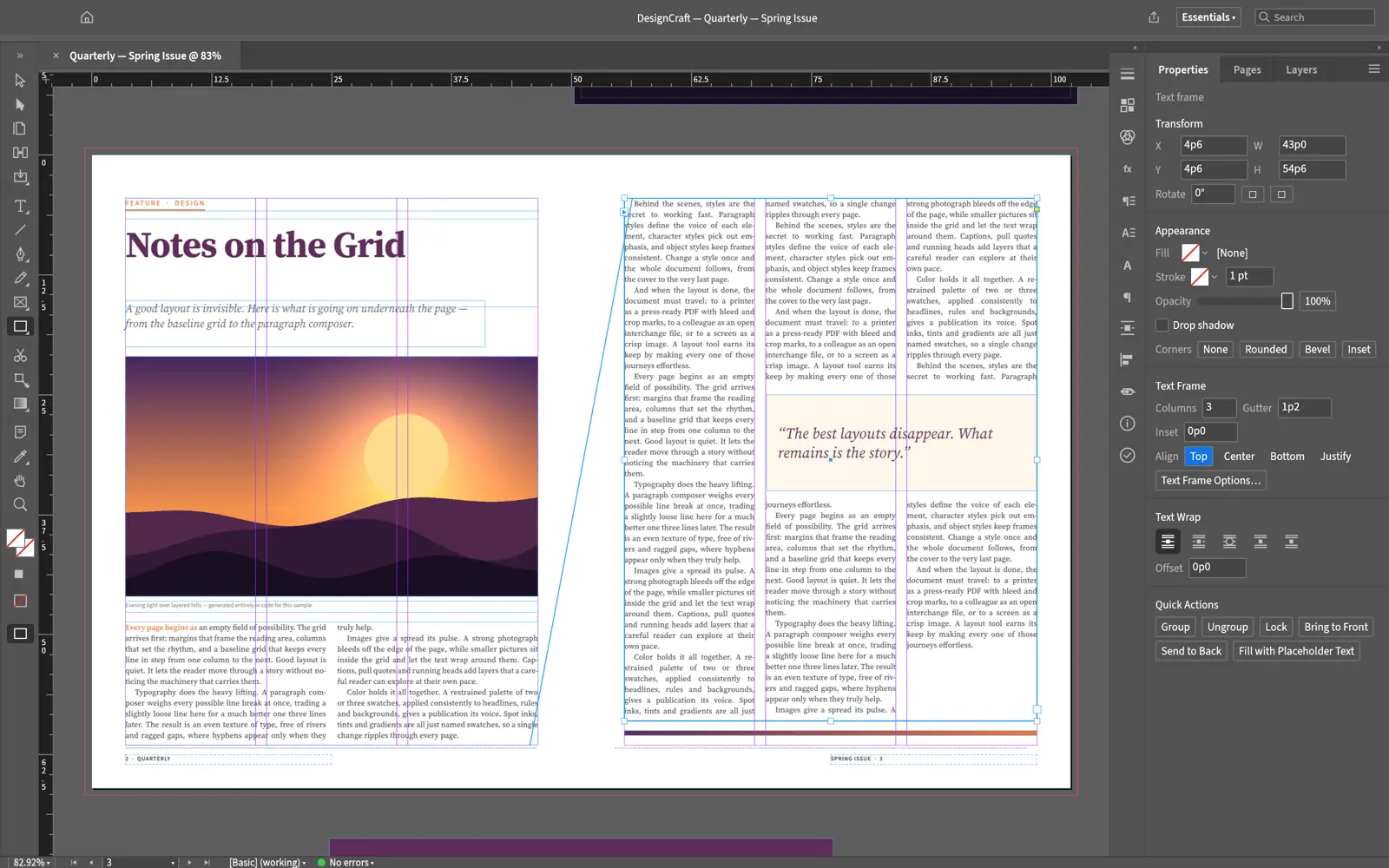
 DesignCraftReplaces Adobe InDesignPage layout and publishingDesignCraft on Linux
Crafting Apps on Linux at a glance
| App | Replaces | Status | Readiness, by its developers | Main caveat |
|---|---|---|---|---|
| PhotoCraft | Adobe Photoshop | Early alpha | 25–35% ready for a pro’s daily work | Pen-tablet input on Wayland is still open (#79); X11 works |
| VectorCraft | Adobe Illustrator | In active development | 40–55% indistinguishable for a power user | Tablet pens are ignored on KDE Plasma Wayland (#491); use XWayland |
| FilmCraft | Adobe Premiere Pro | Young and moving fast | 50–60% ready for real work | No hardware video decoding on Linux, and Linux is its least-tested platform |
| LightCraft | Adobe Lightroom | Young and moving fast | 60–70% of a day-to-day Lightroom | Muted colour on raws other than DNG; Canon CR3 opens as a preview only |
| PdfCraft | Adobe Acrobat | Young and moving fast | ~50% of Acrobat Pro’s offline features | Editing the existing text of a PDF is not reliable yet |
| EffectCraft | Adobe After Effects | Young, moving fast | Not yet for client work, says the project | Linux users hit basic interaction bugs in the first week; most fixed since |
| DesignCraft | Adobe InDesign | In development | of InDesign, self-scored |
Release tracker: every Crafting App version so far
The apps ship a new version every day or two. This chart follows every release, and refreshes from GitHub when we update our data.
Latest Crafting Apps news
No news posts yet. We post here when a release changes what Linux users get.
Linux support every Crafting App shares
The seven apps are separate programs but share one release workflow, packaging layout and UI toolkit. Checked in each repository on Oct 8, 2026; app-specific issues are on each app’s page.
| Linux system or feature | Status | Details |
|---|---|---|
| Ubuntu, Debian, Linux Mint, Pop!_OS | Yes: Official .deb | For x86_64 and ARM64, built on Ubuntu 22.04 by the project’s release workflow, so it needs glibc 2.35 or newer: Ubuntu 22.04+, Debian 12+, Linux Mint 21+. |
| Fedora, RHEL, openSUSE | Yes: Official .rpm | For x86_64 and ARM64. The workflow names Fedora 36+ and RHEL 10 as the oldest it targets; openSUSE is listed in the README’s download table. |
| Arch, Manjaro, CachyOS and any other distro | Yes: AppImage or tarball | The AppImage runs without installing and can update itself through AppImageUpdate (each release ships .zsync files). A plain .tar.gz is there too. No official Arch package. |
| Flatpak | Partly: Bundle, not on Flathub | Each release has a downloadable .flatpak bundle (ai.storyteller.<app>) that pulls the org.freedesktop.Platform//25.08 (26.08 for PhotoCraft) runtime from Flathub. The app itself is not listed on Flathub, so it will not appear in GNOME Software or Discover searches yet. |
| Bazzite, Fedora Silverblue, SteamOS | Yes: AppImage or Flatpak | Both work on immutable systems without layering packages. This is our reading of the formats, not something we tested. |
| ARM64 Linux | Yes: aarch64 builds | Every Linux format also comes as an aarch64 build, built on GitHub’s Ubuntu 22.04 ARM runners. Not verified by us on a Raspberry Pi or Asahi Linux. |
How to install a Crafting App on Linux
Every app installs the same way. The commands below use PhotoCraft 0.5.0; for another app, replace photocraft with its name and use its version from its own page.
Ubuntu, Debian, Linux Mint, Pop!_OS
Download photocraft-0.5.0-linux-x86_64.deb (or the aarch64 one on ARM) from the latest release, then in your Downloads folder:
sudo apt install ./photocraft-0.5.0-linux-x86_64.debFedora, RHEL, openSUSE
Download photocraft-0.5.0-linux-x86_64.rpm, then:
sudo dnf install ./photocraft-0.5.0-linux-x86_64.rpmOn openSUSE: sudo zypper install ./photocraft-0.5.0-linux-x86_64.rpm
Any distro: AppImage
No install needed. Download, make it executable and run it:
wget https://github.com/storytold/photocraft/releases/download/v0.5.0/photocraft-0.5.0-linux-x86_64.AppImagechmod +x photocraft-0.5.0-linux-x86_64.AppImage && ./photocraft-0.5.0-linux-x86_64.AppImageFlatpak bundle
Needs Flatpak with Flathub set up for the runtime. Then:
flatpak install --user photocraft-0.5.0-linux-x86_64.flatpakflatpak run ai.storyteller.photocraftCheck the download
Every release lists a checksum for each file in SHA256SUMS.txt. Download it next to your file and run:
sha256sum -c SHA256SUMS.txt --ignore-missingIt should print OK for the file you downloaded.
What the Crafting Apps look like
Official screenshots from each project, made by the apps themselves on public-domain art and footage.
Adobe on Linux: the Crafting App and the proven alternative
Adobe Creative Cloud has no Linux version. For each Adobe app, here is the Crafting App that copies it and the established Linux app we would use for work with a deadline today.
| Adobe app | Crafting App | Proven Linux alternative |
|---|---|---|
| Photoshop | PhotoCraft | GIMP 3.2, Krita |
| Illustrator | VectorCraft | Inkscape, Figma |
| Premiere Pro | FilmCraft | Kdenlive, DaVinci Resolve |
| Lightroom | LightCraft | darktable, RawTherapee |
| Acrobat | PdfCraft | Okular, PDF Arranger |
| After Effects | EffectCraft | Blender, DaVinci Resolve (Fusion) |
| InDesign | DesignCraft | Scribus, Affinity Publisher |
For Adobe’s own apps, see Photoshop on Linux and the Adobe and creative apps checker.
Who makes the Crafting Apps, and how they were built
The apps come from the ArtCraft team, whose earlier product is an AI image and video studio of the same name. Their Linux app ids start with ai.storyteller, and the commits we read are by developer Brandon Thomas, whom press coverage names as the suite’s creator. Each app lives in its own repository under github.com/storytold; they share conventions but, by their rules, no code.
They were built at extraordinary speed, and mostly by AI. The repositories carry co-author lines for Anthropic’s Claude on their commits and detailed instructions for AI agents (AGENTS.md), and every app can itself be driven by AI agents through an MCP server. Coverage such as Tom’s Hardware describes a solo developer directing Claude to write the Rust code.
The projects call themselves clean-room reimplementations. PhotoCraft’s rules say the team studied Photoshop “for behaviour and look only” and must “never copy their code, shaders, profiles or assets”, implementing from public specifications such as Adobe’s PSD format document. VectorCraft goes further: “never use Adobe software (absolute rule, from the project owner)”. We read those rules; we cannot verify how they were followed. Whether apps that imitate Adobe’s interfaces this closely raise trade-dress or patent questions is untested, and Adobe had not commented publicly when we checked.
What stands out in their favour is candour. Each repository keeps a dated “honest assessment” that lists what is broken and missing, often more bluntly than critics do, and the release notes show bugs reported by users being fixed within a day.
What people are saying about the Crafting Apps
The launch went viral in the first week of October 2026. A summary of the main reactions, with links; the opinions are theirs.
PetaPixel
“Someone Rebuilt Free, Open-Source Versions of Photoshop, Premiere, and Lightroom Using AI”: the headline that took the suite mainstream. It notes the software is in alpha.
Tom’s Hardware
Its headline sums up the launch: a solo developer “rebuilds Adobe Creative Suite in Rust using Claude”, and “targets 100 percent parity in one month despite piracy claims and safety warnings”.
What about ArtCraft itself?
ArtCraft, the team’s original product, is a different kind of app: an AI image and video studio that lets you stage scenes in 2D and 3D, pose characters and then generate with models such as FLUX, Seedream, Kling and Veo. Its README offers stable releases for Windows and macOS and says Linux users should build it from source. It is “fair source”, not open source: free to use and modify for yourself, but not to sell (license). Generation runs through cloud model providers. The seven Crafting Apps do not depend on it.
Viral software attracts fake download sites and repackaged installers. Use the official GitHub releases (each repository is under storytold) or getartcraft.com/apps, and check the file against the release’s SHA256SUMS.txt. Community packages, such as the Gentoo overlay for PdfCraft, are not maintained by ArtCraft. The App Store app “AI Art Generator: ArtCraft” is by a different developer.
Best Linux distros for the Crafting Apps
The packages need glibc 2.35 or newer. Ubuntu, Linux Mint and Fedora get native .deb or .rpm packages; on an immutable distro such as Bazzite, use the AppImage or Flatpak bundle. Ordered by our live ranking.
- 1
Ubuntu26.04.1
Broad support, from your laptop to your server.
DebianGNOMEStableBeginner4 GB+ RAM
Long-term support release options
#1 overallProfile - 2
Linux Mint22.3
A familiar desktop. A comfortable place to start.
Ubuntu LTSCinnamon, MATE, XfceStableBeginner4 GB+ RAM
Familiar desktop layout with useful defaults


ArtCraft apps on Linux: common questions
Do the ArtCraft Crafting Apps run on Linux?
Yes. All seven (PhotoCraft, VectorCraft, FilmCraft, LightCraft, PdfCraft, EffectCraft and DesignCraft) publish native Linux builds with every release: an AppImage, a Flatpak bundle, .deb and .rpm packages and a tarball, for x86_64 and ARM64. They need glibc 2.35 or newer, which means Ubuntu 22.04, Debian 12, Fedora 36 or later.
Are the Crafting Apps really free and open source?
Yes. Each app is dual-licensed under MIT or Apache-2.0, with no account, subscription or telemetry. The ArtCraft name and logos are trademarks and are not covered. ArtCraft’s separate AI studio is different: it uses a “fair source” license and is not open source.
Which Adobe apps do the Crafting Apps replace?
PhotoCraft replaces Photoshop, VectorCraft Illustrator, FilmCraft Premiere Pro, LightCraft Lightroom, PdfCraft Acrobat, EffectCraft After Effects and DesignCraft InDesign.
Are the Crafting Apps ready to replace Adobe?
Not for professional work yet. They were first released between October 1 and 2, 2026, and the developers’ own estimates range from about 25–35% (PhotoCraft, for a pro’s daily work) to about 83% (DesignCraft, self-scored). Linux is less tested than macOS for most of them.
Were the Crafting Apps made with AI?
Largely, yes. The commits in the repositories carry co-author lines for Anthropic’s Claude, and press coverage describes the suite as built by developer Brandon Thomas with Claude. The projects describe themselves as clean-room reimplementations built from public specifications and observed behaviour.
Is it legal to use the Crafting Apps?
Using open-source software you download is legal. Whether apps that closely imitate Adobe’s interfaces raise trade-dress or patent questions has not been tested in court, and Adobe had not commented publicly when we checked. Files you make are yours.
Are the Crafting Apps on Flathub?
Not yet. Each release ships a downloadable .flatpak bundle you install with flatpak install --user, and PhotoCraft’s documentation says its Flathub manifest is ready for submission.
Is PrintCraft the same as PdfCraft?
Yes. The Acrobat-style app was renamed from PrintCraft to PdfCraft on October 7, 2026. Some early coverage still uses the old name.
Does ArtCraft (the AI studio) run on Linux?
How we researched these pages
- What we did. On Oct 8, 2026 we cloned all seven repositories and read their READMEs, roadmaps and honest assessments, Linux packaging manifests, release workflows (for the Linux formats, architectures and minimum glibc), Cargo manifests (for the shared UI toolkit), license files and git tags (for release dates). Screenshots are the projects’ own, used under their MIT or Apache-2.0 licenses.
- What we did not do. We have not run the apps, benchmarked them or audited their code. Feature lists and readiness percentages are the developers’ claims and are labelled that way. Press reactions are summarised from the outlets’ published coverage and linked.
- How fresh it is. The apps release every day or two. Release dates and versions on these pages refresh with our data; the text of each app page says which version it was checked against.
- Independence. distro.watch is independent and has no relationship with ArtCraft, Storyteller or Adobe. This page has no affiliate links. See our editorial standards.
Running a Crafting App on Linux? Send your distro, desktop, graphics card and what worked or broke, or a correction, to contact@distro.watch.
What changed on this page
- Hub and seven app pages published: Linux packages and status for every app, install commands, screenshots, release history, what people are saying, and the established Linux alternatives.
Sources
- GitHub: storytold/photocraft (README, roadmap, packaging) · releases
- GitHub: storytold/vectorcraft (README, roadmap, packaging) · releases
- GitHub: storytold/filmcraft (README, roadmap, packaging) · releases
- GitHub: storytold/lightcraft (README, roadmap, packaging) · releases
- GitHub: storytold/pdfcraft (README, roadmap, packaging) · releases
- GitHub: storytold/effectcraft (README, roadmap, packaging) · releases

