
EffectCraft on Linux: a free After Effects alternative
Yes, EffectCraft runs natively on Linux, with an AppImage, Flatpak bundle, .deb and .rpm for x86_64 and ARM64. It is a free, open-source (MIT or Apache-2.0) motion-graphics compositor modelled on After Effects: compositions, keyframes and a Graph Editor, 306 effects, JavaScript expressions, 3D cameras and lights, and Lottie import and export. It is the youngest of the Crafting Apps (first commit October 1, 2026), cannot open .aep projects, and Linux users have already hit basic interaction bugs.
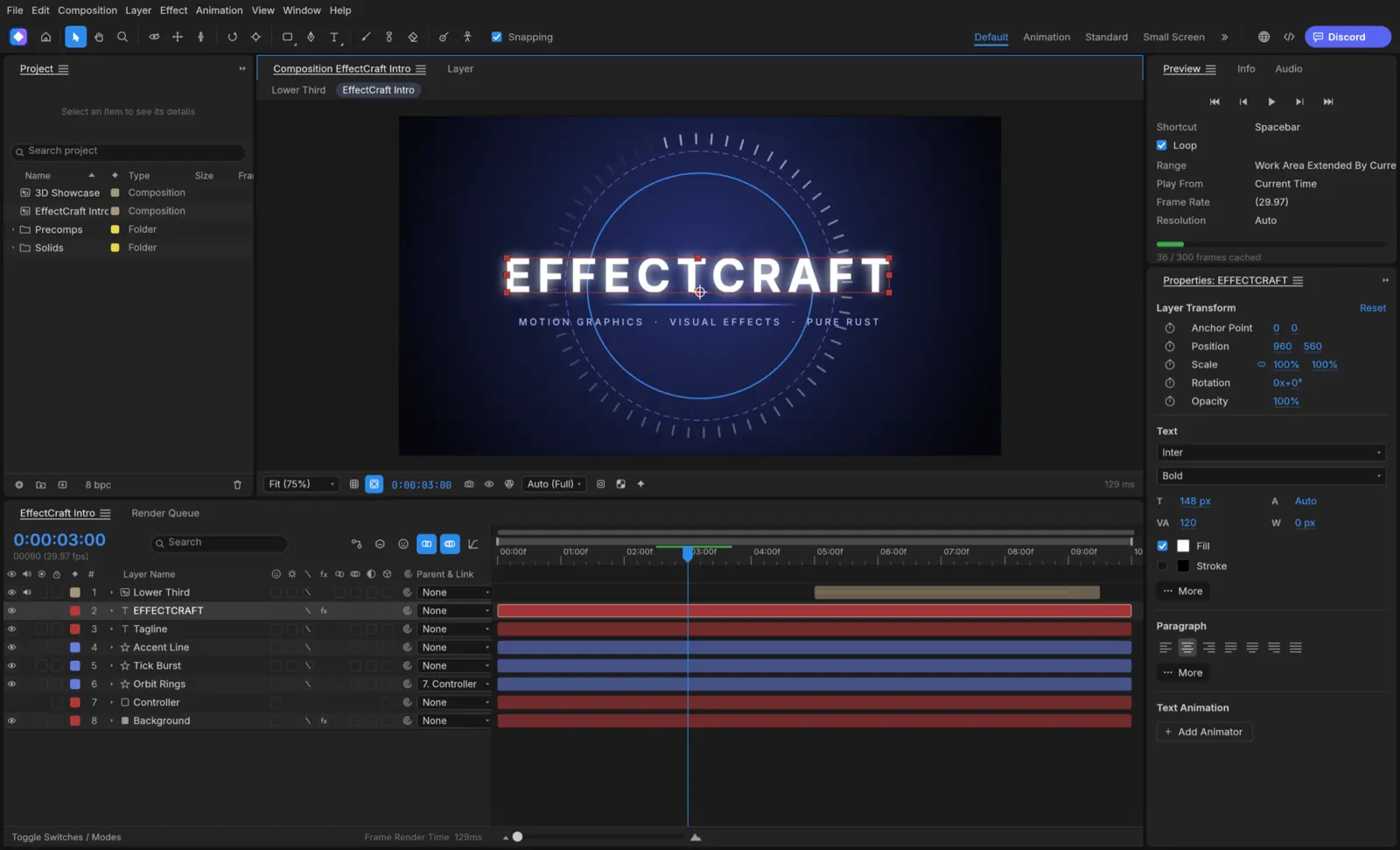
“Nearly every After Effects feature exists, including all of its effects, but existing is not the same as behaving exactly like After Effects, and we haven’t measured that yet” (gaps and honest assessment).
How to install EffectCraft on Linux
Commands for EffectCraft 0.6.0, the latest release when this page was built. Download only from the official GitHub releases of storytold/effectcraft or the EffectCraft page on getartcraft.com. File names change with each version.
Ubuntu, Debian, Linux Mint, Pop!_OS
Download effectcraft-0.6.0-linux-x86_64.deb (or the aarch64 one on ARM) from the latest release, then in your Downloads folder:
sudo apt install ./effectcraft-0.6.0-linux-x86_64.debFedora, RHEL, openSUSE
Download effectcraft-0.6.0-linux-x86_64.rpm, then:
sudo dnf install ./effectcraft-0.6.0-linux-x86_64.rpmOn openSUSE: sudo zypper install ./effectcraft-0.6.0-linux-x86_64.rpm
Any distro: AppImage
No install needed. Download, make it executable and run it:
wget https://github.com/storytold/effectcraft/releases/download/v0.6.0/effectcraft-0.6.0-linux-x86_64.AppImagechmod +x effectcraft-0.6.0-linux-x86_64.AppImage && ./effectcraft-0.6.0-linux-x86_64.AppImageFlatpak bundle
Needs Flatpak with Flathub set up for the runtime. Then:
flatpak install --user effectcraft-0.6.0-linux-x86_64.flatpakflatpak run ai.storyteller.effectcraftCheck the download
Every release lists a checksum for each file in SHA256SUMS.txt. Download it next to your file and run:
sha256sum -c SHA256SUMS.txt --ignore-missingIt should print OK for the file you downloaded.
These are the standard commands for each package type, with file names taken from the project’s release workflow. We have not run them on every distro. Newer releases replace older ones when installed the same way; the AppImage can also update itself with AppImageUpdate.
EffectCraft screenshots: what it looks like
Official screenshots from the EffectCraft repository, made by the app itself on public-domain artwork and footage. Select one to open it full size.
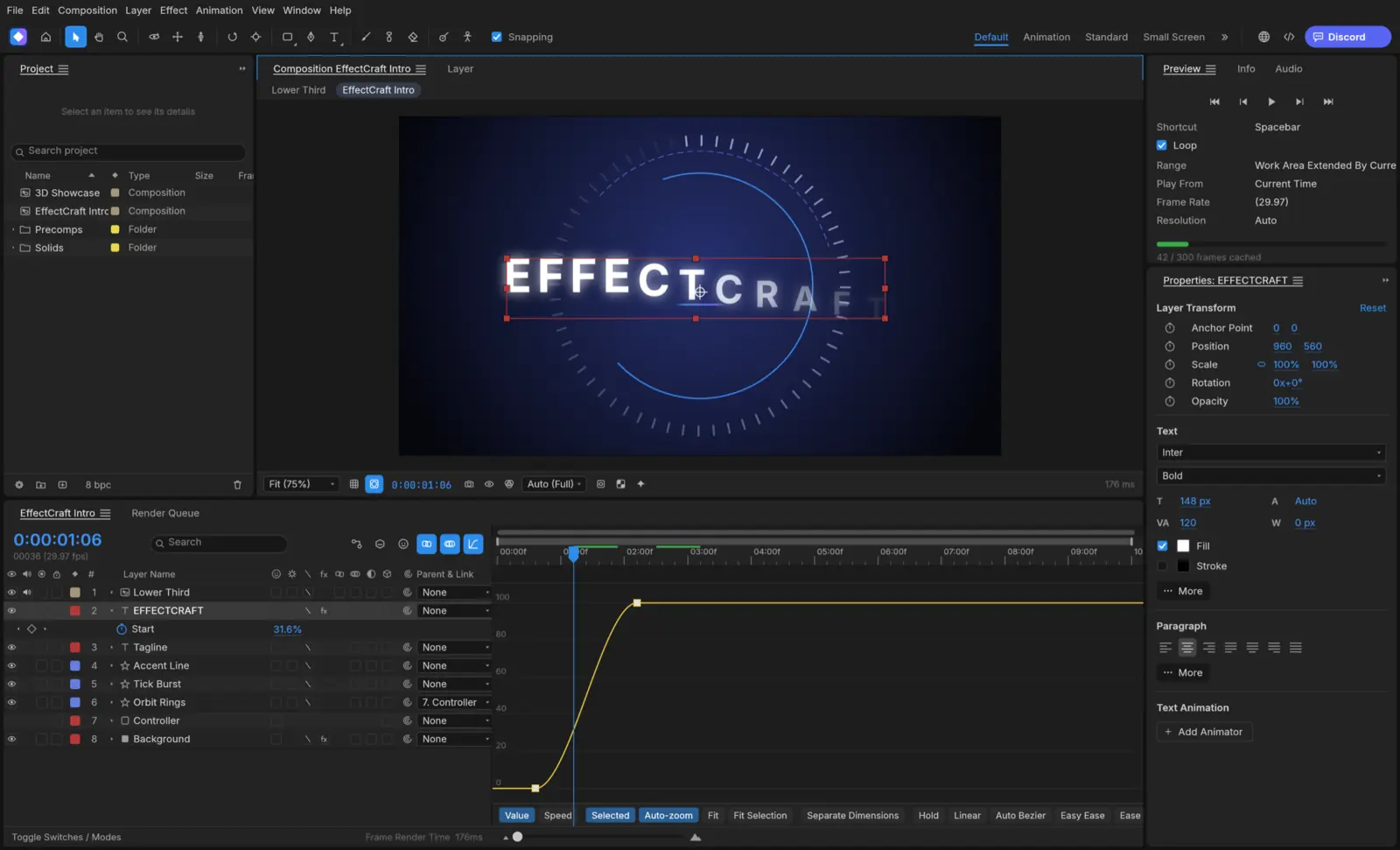
Keyframes that behave like After Effects
Linear, Bezier, hold and auto Bezier keys, Easy Ease (F9), roving keys, value and speed graphs, the property shortcuts (P, S, R, T…) and expressions with wiggle and loopOut.
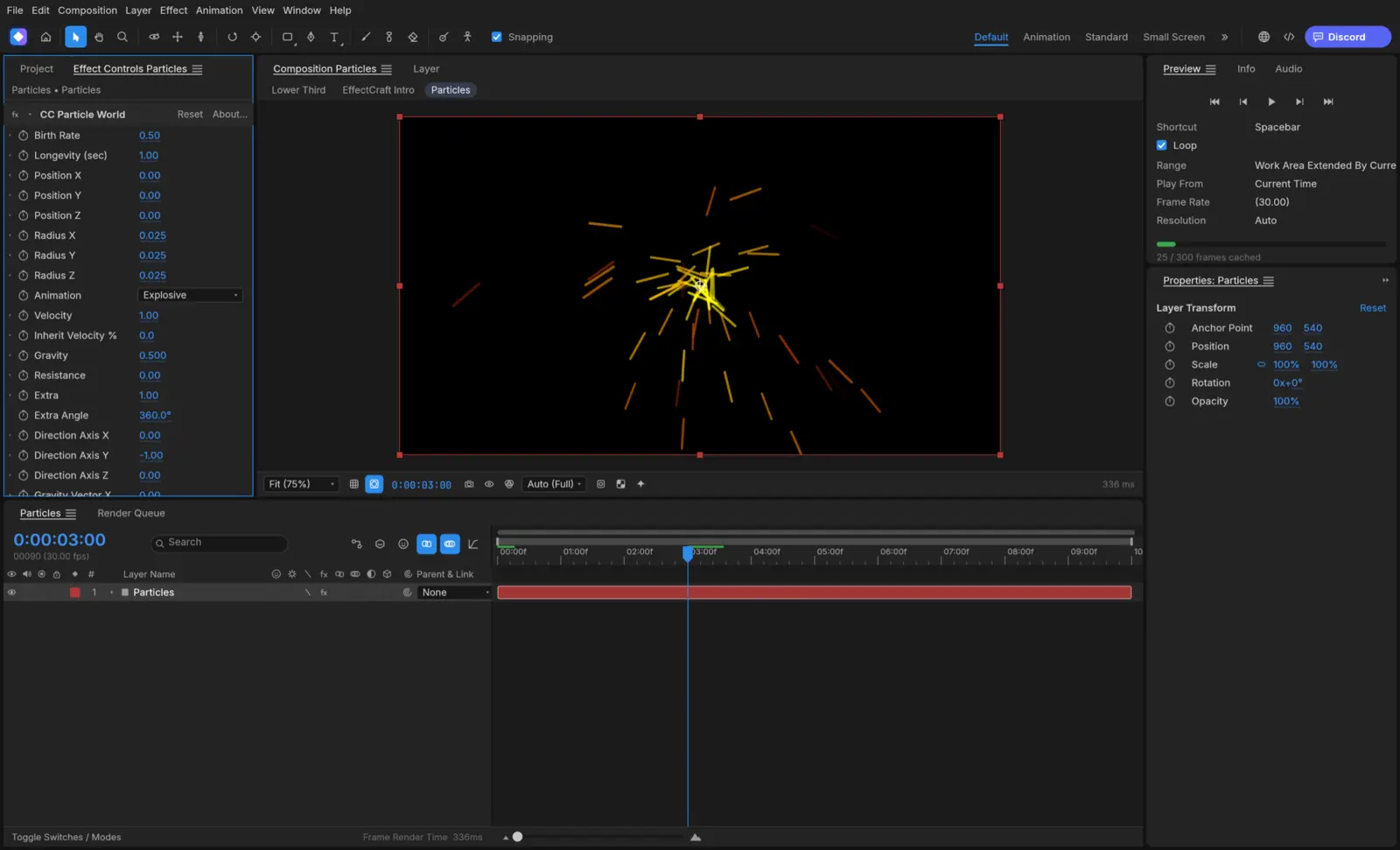
306 effects
The project lists every one of After Effects’ 298 effects plus more, with their parameter names and defaults: Fractal Noise, Turbulent Displace, keying, particles, Shatter and the time effects, plus all nine layer styles.
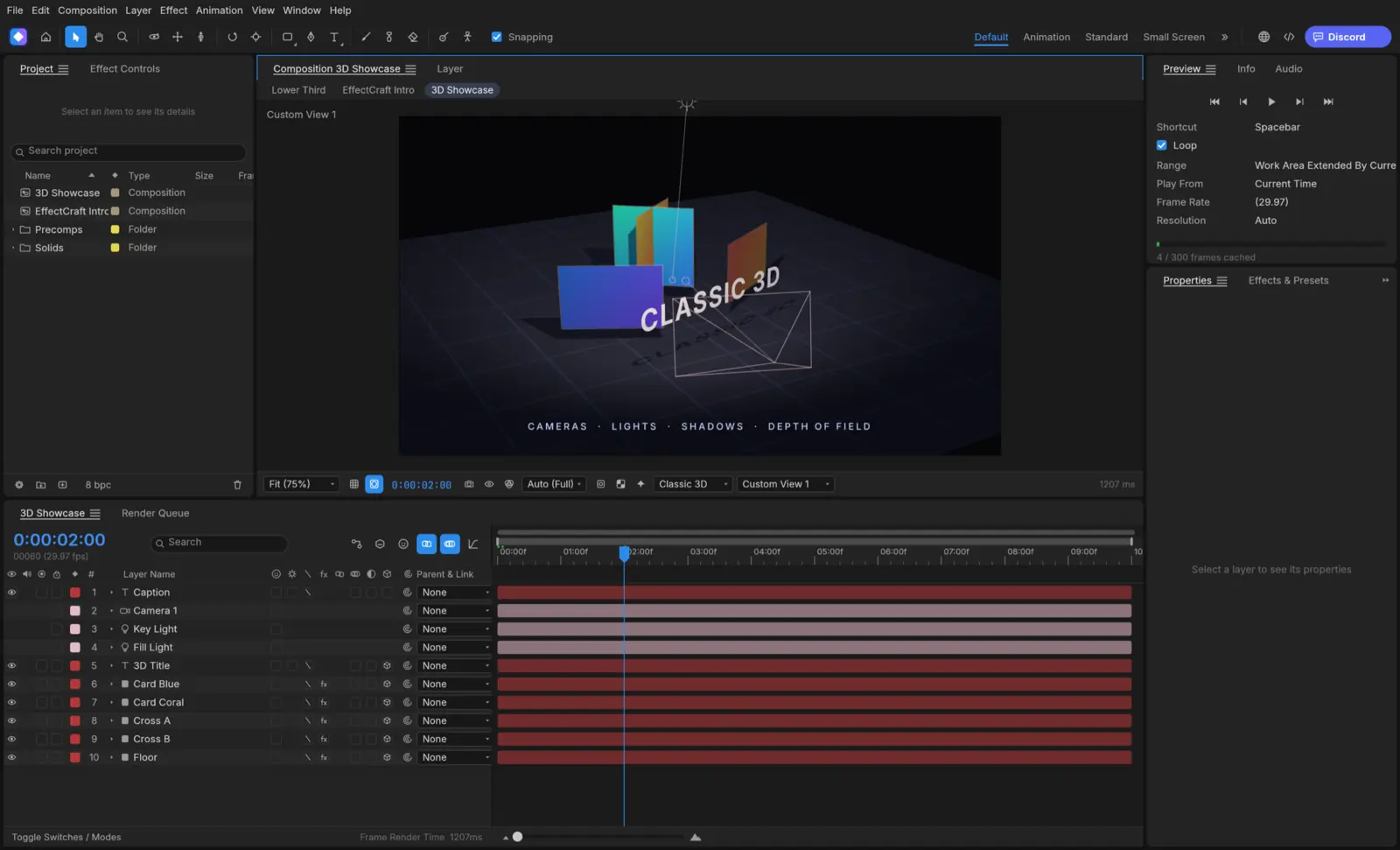
Classic 3D
3D layers, one- and two-node cameras with depth of field, parallel, spot, point and ambient lights with ray-traced soft shadows, and orbit, pan and dolly tools.
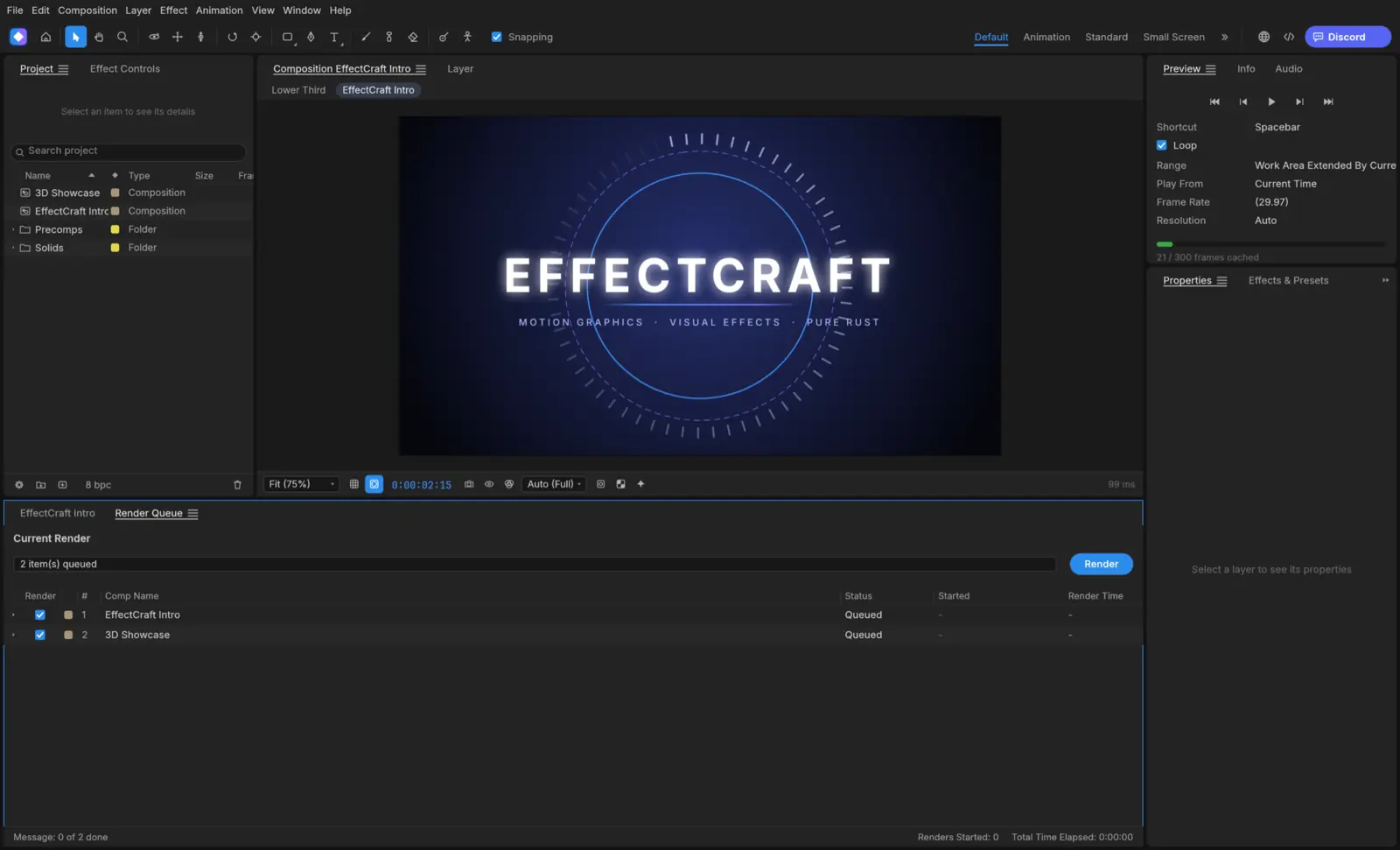
Render queue and Lottie
H.264, ProRes 4444 with alpha, HEVC, AV1 and VP9 WebM, image sequences and GIF from pure-Rust encoders, with no FFmpeg. Compositions export to Lottie JSON for the web and apps.
Screenshots: EffectCraft project, MIT or Apache-2.0. Feature descriptions are the project’s claims; we have not tested them.
EffectCraft Linux support at a glance
Checked on Oct 8, 2026 against EffectCraft 0.6.0: its release workflow, Linux packaging, documentation and roadmap.
| Linux system or feature | Status | Details |
|---|---|---|
| Ubuntu, Debian, Linux Mint, Pop!_OS | Yes: Official .deb | For x86_64 and ARM64, built on Ubuntu 22.04 by the project’s release workflow, so it needs glibc 2.35 or newer: Ubuntu 22.04+, Debian 12+, Linux Mint 21+. |
| Fedora, RHEL, openSUSE | Yes: Official .rpm | For x86_64 and ARM64. The workflow names Fedora 36+ and RHEL 10 as the oldest it targets; openSUSE is listed in the README’s download table. |
| Arch, Manjaro, CachyOS and any other distro | Yes: AppImage or tarball | The AppImage runs without installing and can update itself through AppImageUpdate (each release ships .zsync files). A plain .tar.gz is there too. No official Arch package. |
| Flatpak | Partly: Bundle, not on Flathub | Each release has a downloadable .flatpak bundle (ai.storyteller.effectcraft) that pulls the org.freedesktop.Platform//25.08 runtime from Flathub. The app itself is not listed on Flathub, so it will not appear in GNOME Software or Discover searches yet. |
| Bazzite, Fedora Silverblue, SteamOS | Yes: AppImage or Flatpak | Both work on immutable systems without layering packages. This is our reading of the formats, not something we tested. |
| ARM64 Linux | Yes: aarch64 builds | Every Linux format also comes as an aarch64 build, built on GitHub’s Ubuntu 22.04 ARM runners. Not verified by us on a Raspberry Pi or Asahi Linux. |
| Dropping files on the window (Wayland) | No: Not on Wayland | The apps use eframe 0.36, whose windowing library (winit 0.30) has no Wayland drag and drop (winit #1881). Use File › Open, or start the app under XWayland: WAYLAND_DISPLAY= effectcraft. |
| Older distros (Ubuntu 20.04, Debian 11, CentOS 7) | No: Too old | Their glibc is older than 2.35, so the native packages will not start. The project also publishes a browser (WebAssembly) build you can host yourself. |
| Basic interaction on Linux | Partly: Bugs being fixed | The first Linux reports (issues #41–#47, from the 0.1.1 AppImage on October 5) covered panning, panel resizing, drag and drop, renaming and the Wayland window icon; the project says most were fixed by October 6–7. “macOS is the most tested platform.” |
| Wayland file drops | No: Waiting on winit | Dropping files from the file manager onto EffectCraft does not work under Wayland. Use File › Import or XWayland. |
| Roto Brush and face tracking | Yes: Optional downloads | Roto Brush can use MobileSAM (an optional 40 MB download) and face tracking Google’s MediaPipe model (3.8 MB), both from Settings. Neither is downloaded without asking. |
What works in EffectCraft, and what is missing
Works today, per the project
- Compositions, precomps, parenting, track mattes, 38 blend modes and motion blur
- Shape layers with trim paths and repeaters, masks and text animators
- JavaScript expressions with the After Effects object model
- Puppet pins, 3D cameras and lights
- Lottie import and export, readable JSON project files
Missing or unfinished
- Cannot open .aep or .aepx projects
- After Effects plug-ins do not run
- Behaviour not yet compared with After Effects automatically
- Less tested on Linux and Windows than macOS
- Multi-monitor support
File formats: Projects are versioned JSON (.ecproj). Renders H.264 MP4, ProRes MOV (up to 4444 XQ with alpha), HEVC and AV1 MP4, WebM (VP9 or AV1 with Opus), PNG, JPEG, TIFF and 32-bit EXR sequences, GIF and WAV/AIFF. Imports and exports Lottie (.json, .lottie).
EffectCraft release history
EffectCraft was first released on Oct 2, 2026 and has shipped a new version every day or two since. This chart updates when we refresh our release data.
Show the release dates as a table
| App | Releases, newest first |
|---|---|
| EffectCraft | 0.6.0 (Oct 8, 2026) · 0.4.0 (Oct 7, 2026) · 0.3.1 (Oct 6, 2026) · 0.3.0 (Oct 6, 2026) · 0.2.0 (Oct 5, 2026) · 0.1.1 (Oct 3, 2026) · 0.1.0 (Oct 2, 2026) |
Latest EffectCraft news
No news posts yet. We post here when a EffectCraft release changes what Linux users get.
EffectCraft vs the best After Effects alternatives on Linux
| App | Best for | Maturity | License | On Linux |
|---|---|---|---|---|
| EffectCraft | After Effects users who want the same panels and keyframes | Youngest of the suite, first commit October 1, 2026 | Free, MIT or Apache-2.0 | AppImage, Flatpak bundle, .deb, .rpm |
| Blender | 3D, compositing and motion graphics with a huge community | Mature | Free, GPL | Distro repositories, Flathub, official builds |
| DaVinci Resolve (Fusion) | Node-based compositing inside a full editor | Industry standard | Free version; Studio is paid | Official Linux installer |
Our view: EffectCraft is the first open-source app to aim squarely at After Effects’ workflow, and its Lottie support is useful on its own. It is also a week old: try it for personal motion-graphics work, and expect to report bugs. Blender and Fusion in DaVinci Resolve remain the reliable options on Linux. This is an editorial judgment from the project’s code, documentation and issue reports, not from hands-on benchmarks.
The apps went viral in early October 2026, which attracts look-alike download sites. Check the checksum against SHA256SUMS.txt from the official release. An App Store app called “AI Art Generator: ArtCraft” is by a different developer and unrelated.
The other Crafting Apps on Linux




EffectCraft on Linux: common questions
Does EffectCraft work on Linux?
Yes. EffectCraft ships an AppImage, a Flatpak bundle, .deb and .rpm packages and a tarball for x86_64 and ARM64 Linux. The project says Linux users have hit basic interaction bugs, which it is fixing first.
Can EffectCraft open After Effects projects?
No. EffectCraft cannot open .aep or .aepx files, and After Effects plug-ins do not run. Projects are saved as readable JSON (.ecproj), and animations can move through Lottie.
Does EffectCraft support expressions?
Yes. It runs JavaScript expressions with the After Effects object model, including wiggle, loopOut and thisComp.layer, with an inline editor and the pick-whip.
Can EffectCraft export Lottie animations?
Yes. File › Export › Lottie JSON writes a composition as .json or .lottie and lists anything Lottie cannot express; Lottie files can also be imported as new compositions.
Is EffectCraft free?
Yes. It is open source under the MIT or Apache-2.0 license.
How we researched this page
- What we did. On Oct 8, 2026 we read EffectCraft’s repository directly: the README, roadmap and honest-assessment documents, Linux packaging, the release workflow (to confirm which Linux files are built and for which glibc) and its Cargo manifest. Release dates come from the project’s git tags.
- What we did not do. We have not run EffectCraft or benchmarked it, and we did not audit its code. Feature lists and readiness percentages are the developers’ own and are labelled that way.
- How fresh it is. EffectCraft ships a new version every day or two. The release history refreshes with our data; the text was checked against 0.6.0.
- Independence. distro.watch is independent and has no relationship with ArtCraft, Storyteller or Adobe. This page has no affiliate links. See our editorial standards.
Running EffectCraft on Linux? Send your distro, desktop (Wayland or X11), graphics card and what worked or broke, or a correction, to contact@distro.watch. Bugs belong in the EffectCraft issue tracker.
What changed on this page
- Page published, checked against EffectCraft 0.6.0: Linux packages and status, install commands, screenshots, what works and what is missing, comparison with established Linux apps, and release history.
Sources
- GitHub: storytold/effectcraft README
- EffectCraft gaps and honest assessment
- EffectCraft ROADMAP
- GitHub: EffectCraft releases
- GitHub: EffectCraft release workflow (Linux builds, glibc 2.35)
- getartcraft.com: EffectCraft
distro.watch is independent and not affiliated with ArtCraft or Adobe. After Effects is a trademark of Adobe Inc.; it is named only to describe the workflow EffectCraft imitates.